Retro Computer: A Pixelated Typeface for Modern Projects with Vintage Charm
If you’ve ever stared at the glowing screen of an arcade cabinet or typed out BASIC code on a bulky CRT monitor, you know the unmistakable charm of early digital design. The Retro Computer font captures that essence, translating the rigid, blocky aesthetics of 8-bit systems into a usable, expressive typeface for today’s designers and creators. It’s not just a throwback — it’s a functional, character-rich font built for those who want to inject a bit of pixelated soul into their work.
What Makes Retro Computer Unique?
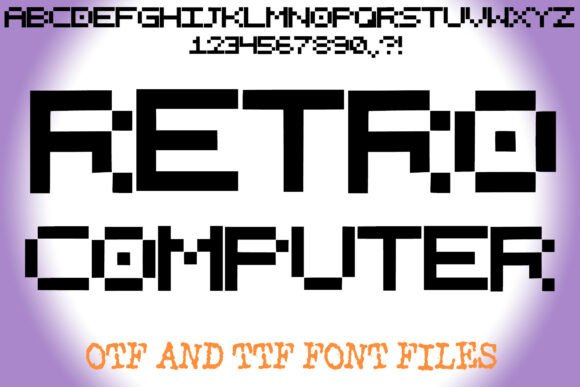
At its core, Retro Computer is a geometric display font inspired by the bitmap lettering of early computer terminals and gaming consoles. Each letter is constructed on a strict grid, giving it a modular, mechanical look. The monospaced structure and sharp, square edges mimic the low-resolution screens of the past, creating a visual rhythm that feels both nostalgic and intentional.
Unlike many modern fonts that prioritize sleekness or minimalism, Retro Computer leans into its chunky, angular design. This isn’t a font for subtle branding or elegant invitations — it’s bold, digital, and designed to stand out. Whether you’re building a game interface or designing a tech-themed poster, this font delivers a clear visual message: this is digital nostalgia, done right.
When and Why Use Retro Computer?
The appeal of Retro Computer lies in its ability to evoke a specific time and place in digital history. But beyond the aesthetic, it’s also a practical choice for a number of applications:
- Gaming interfaces: From arcade-style UI elements to pixel art game titles, this font fits right in with retro gaming design.
- Poster design: Whether it’s for a tech event, a synthwave concert, or a vintage-themed launch, Retro Computer adds immediate visual impact.
- Branding for tech startups: Especially for companies that want to highlight a DIY or hacker aesthetic, this font offers a bold, memorable identity.
- Coding and development tools: UI elements, documentation headers, or terminal emulators can benefit from the structured, readable look of this font.
Real-World Use Cases for Retro Computer
Let’s look at how different users might incorporate Retro Computer into their work — and why it might be the right choice.
1. For the Indie Game Developer
If you’re building a pixel art game or a modern twist on a classic arcade title, Retro Computer is a natural fit. It works well in menus, HUDs, and level select screens. Because of its monospaced nature, it aligns well with grid-based UI layouts, making it easier to design consistent, readable interfaces.
Imagine a game menu where the title, options, and credits all use Retro Computer — it creates a cohesive look that feels like a direct callback to the games of the 1980s. And because of its clarity at larger sizes, players can read it easily, even on smaller screens.
2. For the Designer Creating a Tech-Themed Poster
Say you’re designing a poster for a local tech meetup or a retro gaming convention. You want the design to feel energetic, bold, and rooted in digital culture. Retro Computer gives you that punchy, pixelated look without being too kitschy.
You might use it as the main headline font, paired with a cleaner sans-serif for body text. This contrast helps maintain readability while still letting the Retro Computer shine as the visual centerpiece.
3. For the Educator Teaching Programming
When teaching coding to beginners, especially younger students or hobbyists, using a font that feels familiar to early computing environments can help create a more engaging experience. Tools like terminal emulators, code snippets, or even slide decks can benefit from the use of Retro Computer.
It gives students a visual connection to where programming began — on green-screen terminals and early home computers — making the learning experience more immersive and less abstract.
4. For the Entrepreneur Launching a Retro Tech Brand
If you’re starting a business that sells vintage-style electronics, custom arcade machines, or even a line of retro-inspired apparel, Retro Computer can be part of your brand identity. It’s distinctive enough to stand out in a crowded market and conveys a clear message: this is about digital heritage, craftsmanship, and authenticity.
From logo design to packaging and website headers, using this font consistently can help build brand recognition and emotional connection with your audience.
Things to Consider Before Using Retro Computer
While Retro Computer has a strong visual identity, it’s not a one-size-fits-all solution. Here are a few practical considerations to keep in mind:
- Readability at small sizes: Because of its blocky nature, this font can become less legible when used too small, especially in long paragraphs.
- Pairing with other fonts: While it works well as a headline or display font, it’s best paired with a more readable sans-serif or serif font for body text.
- Color contrast: To maintain clarity, especially on digital screens, make sure there’s enough contrast between the font and background — especially if you’re mimicking a CRT display with a dark background.
- Licensing: If you're using the font for commercial work, check whether you need a specific license or have usage restrictions.
Final Thoughts: Is Retro Computer Right for You?
Whether you're a game developer, graphic designer, educator, or entrepreneur, Retro Computer offers a unique blend of form and function. It’s more than just a throwback — it’s a design tool that can help you communicate authenticity, nostalgia, and digital craftsmanship in a modern context.
Before you download or purchase it, think about how and where you’ll use it. Will it be the star of your design, or a supporting element? Does it fit your audience’s expectations and the tone of your project? When used thoughtfully, Retro Computer can be more than a font — it can be a statement.